
Nineteen parameters, and the four that matter are missing
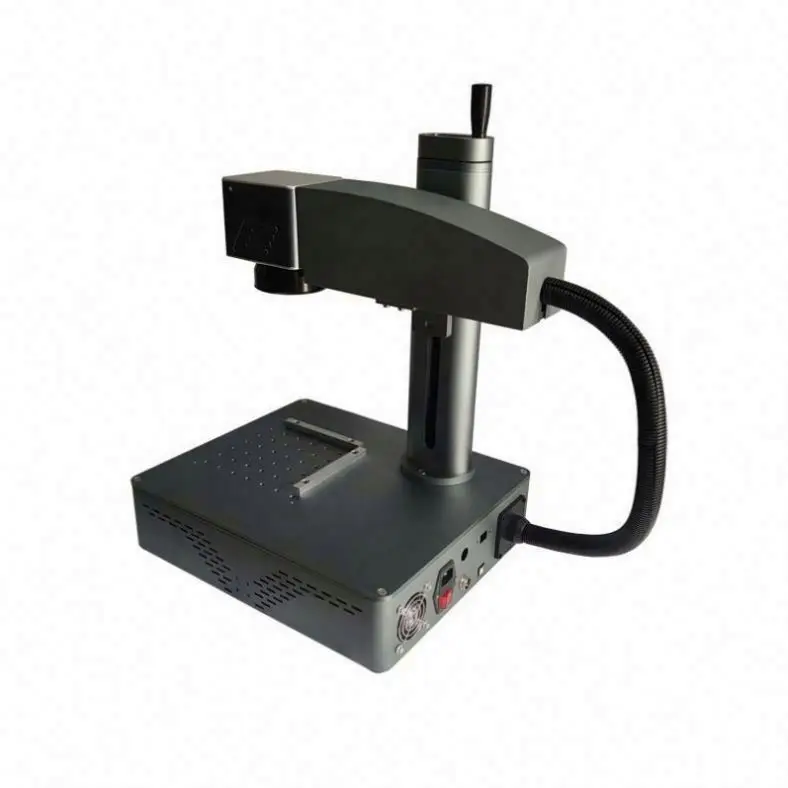
This is a desktop fibre laser marking machine. It is sold with a parameter block of nineteen rows, a title that states a power figure, a model number that implies a different one, and a description that offers three. Small enough to sit on a bench, light enough at 20 kg for two people to lift, and specified with 0.01 mm working accuracy over a 150 × 150 mm field.
None of that tells you what the machine can mark. The four numbers that actually decide the capability of any fibre marker are pulse width, pulse frequency, focused spot diameter and marking speed. This listing states none of the four. That is the central problem with buying from this page, and it is worth being blunt about it: wattage is the number every buyer compares and the least informative number on the sheet.
The block below is transcribed exactly as published, header row removed.
| Field | Published value |
|---|---|
| Application | Laser marking |
| Laser type | Fibre laser |
| Laser source brand | RAYCUS |
| Control system brand | WEIHONG |
| Control software | EZCAD |
| Working accuracy | 0.01 mm |
| Marking area | 150 mm × 150 mm |
| Cooling mode | Air cooling |
| Graphic formats | AI, PLT, DXF |
| CNC or not | Yes |
| Weight | 20 kg |
| Condition | New |
| Place of origin | China |
| Key selling point | High productivity |
| Warranty | 3 years |
| Warranty, core components | 3 years |
| Machinery test report | Provided |
| Video outgoing inspection | Provided |
| Applicable industries | 13 sectors listed, including home use |
Two of those nineteen rows are worth the price of the page on their own: the source brand and the field size. The rest is either boilerplate or, in one case, internally impossible. We will take them in order.
Three power figures on one page
The title says 20 watts. The model number is XY-10. The description opens with “XY-10 20W/30W/50W”. Those are three different claims about the same machine, and only one of them can be right for the unit that ships.
| Where | What it says | What it implies |
|---|---|---|
| Product title | 20 Watts | One source, 20 W |
| Model number | XY-10 | A 10 W source, if the suffix tracks power |
| Description headline | 20W / 30W / 50W | Three SKUs behind one page |
| Parameter block | No power field at all | The one field that would settle it is absent |
There are three ordinary explanations and they have very different consequences. First, XY-10 is a series name that stopped tracking the fitted source, and the machine really is 20 W. Second, the machine is 10 W and the title is wrong, in which case every capability claim on this page overstates by a factor of two. Third, the page is a single entry covering 20, 30 and 50 W units at different prices, and whatever price you were quoted refers to one of them without saying which.
You cannot resolve this from the page. You can resolve it in one message: ask for a photograph of the source nameplate, which carries the model and the rated output, and ask which configuration the quoted price covers. A 20 W and a 50 W machine are not the same product with a different label. The cabinet, the cooling, the weight and the price all move.
A wattage is not a specification
Average power tells you how much energy arrives per second. It does not tell you how that energy is packaged, and the packaging is what determines whether you can anneal stainless steel without cutting it, whether you can mark silver, and how fast a line can be drawn. Four numbers do that work.
Pulse width, and the Q-switched versus MOPA question
Fibre sources come in two families. A fixed-pulse-width Q-switched source fires a pulse of set duration, typically in the low nanoseconds, and you adjust power and frequency. A MOPA source lets you set the pulse duration itself, commonly from a couple of nanoseconds to a few hundred. That second family is what makes colour marking and dark annealing on stainless steel repeatable, because short pulses at high peak power anneal the oxide layer instead of ablating metal, and long pulses at low peak power do the opposite.
RAYCUS builds both families. This listing says “fibre laser” and stops there, so on the published information you cannot tell which one you are buying. If your application is black marking on stainless steel, surgical instruments, or anything where surface colour rather than removed material is the point, this is the first question to ask, not the last.
Pulse frequency, and what it does to each pulse
At fixed average power, raising the frequency divides the same energy into more, smaller pulses. The arithmetic below is simply 20 W divided by the repetition rate.
| Frequency | 20 W source, energy per pulse | 50 W source, energy per pulse |
|---|---|---|
| 20 kHz | 1.000 mJ | — |
| 30 kHz | 0.667 mJ | 1.667 mJ |
| 50 kHz | 0.400 mJ | 1.000 mJ |
| 80 kHz | 0.250 mJ | — |
Between 20 kHz and 80 kHz the same 20 W machine delivers four times more energy per pulse at the low end than at the high end. That is the whole reason reflective metals behave differently from steel: silver and copper need high peak power to couple energy at all, which means low frequency, which means fewer pulses per second and slower travel. A seller who quotes only average power has hidden the parameter that decides whether your silver blanks mark at all.
Spot diameter, which sets the finest line you can draw
No field on this page states the focused spot. A 150 × 150 mm field is normally reached with a lens in the region of 210 mm focal length, and the spot that produces is a few hundredths of a millimetre across. This is the number that limits line width, not the accuracy figure. Ask for it explicitly, and ask for the minimum line width at the specified field.
Marking speed, which sets throughput
“High productivity” is listed as the key selling point. There is no speed figure anywhere on the page. Marking speed in millimetres per second, together with the number of passes and the operator's load and unload time, is what actually determines how many parts an hour you get. Without it, the productivity claim is a word.
150 × 150 mm is smaller than the machine looks
The base plate is visibly larger than the marking field. Only the 150 mm square directly under the lens marks; a part clamped outside that square receives nothing, which is a common and expensive surprise on a first fibre marker. Here is what actually fits, using the ISO/IEC 7810 ID-1 card at 85.60 × 53.98 mm as the reference object.
| Object | Size | Share of the 150 × 150 field |
|---|---|---|
| Field area | 22,500 mm² | 100% |
| ID-1 card (bank card, badge) | 4,620.7 mm² | 4.87 cards would fit |
| 100 × 100 mm plaque | 10,000 mm² | 44.4% |
| 120 × 80 mm plate | 9,600 mm² | 42.7% |
| 150 × 100 mm plate | 15,000 mm² | 66.7% |
A 150 × 150 field is generous for jewellery tags, pendants, cutlery, tool flutes, and small nameplates. It is tight for anything that has to be marked in one pass and is bigger than a postcard. If your work is larger, the field is fixed by the lens: a bigger lens gives a bigger square, but it also widens the spot and lowers the energy density at the surface, so going from 150 to 200 mm is not a free upgrade. Ask which lens is fitted and what the spot becomes at that field.
0.01 mm accuracy is a positioning figure, not a line width
Dividing the field by the stated accuracy: 150 mm at 0.01 mm increments gives 15,000 addressable steps per axis, or 225,000,000 addressable points across the field. That is a real number and it is a genuine capability, but it is routinely misread.
What 0.01 mm describes is how precisely the galvo mirrors can aim the beam. What it does not describe is the width of the mark left behind, which is set by the focused spot and by how the pulses overlap along the path. Those are different quantities. If the spot is larger than a hundredth of a millimetre, and on a 150 mm field it almost certainly is, then “0.01 mm accuracy” does not mean you can draw a 0.01 mm line.
What the figure does buy you is registration. Re-marking a part that already carries a datum, or running a second pass over a large workpiece held in two positions, will land within a hundredth of a millimetre of where it landed the first time. For two-pass marking of long parts and for marking on pre-machined features, that is worth having. Ask for the spot diameter and the minimum line width alongside it, and the two figures together tell you what the machine will actually produce.
RAYCUS, WEIHONG and EZCAD: three names that do not belong to one machine
This is the one row on the page that is not merely incomplete but internally impossible. EZCAD is the marking package distributed with galvo controller cards from the BJJCZ family. WEIHONG is a motion-control brand whose controllers run their own software stack. A single machine does not run EZCAD on a WEIHONG board, so one of those two fields is a leftover from a template.
This matters more than it looks. The controller is what determines what software you can run, and the software determines almost everything you will live with day to day:
- Whether you are locked into EZCAD or can use LightBurn, which many operators prefer for its layer and parameter management.
- Whether a rotary attachment is supported in software, and how it is configured.
- Whether a per-material parameter library exists, or whether you develop every recipe by trial.
- Whether a replacement board is available in year three, and at what price. Controller boards fail, and a machine whose board is unobtainable becomes scrap.
Ask for three things: a photograph of the controller board inside the cabinet, the exact software name and version string from the about screen, and confirmation that the same board can be supplied as a spare. That last question is the one most buyers forget and the one that decides whether the machine has a second life.
One related note: the page answers “CNC or not” with yes. A galvo marker executes a numerically controlled path, so the answer is defensible in the loosest sense, but this is an e-commerce filter checkbox rather than a capability. There is no G-code here and no interpolation of a cutting tool. If your workflow expects to post G-code from CAM, this is not that kind of machine.
Air cooling at 20 W is normal. At 50 W it is a different machine
One axial fan is visible on the rear panel, and the back photograph labels it plainly: Fan. Alongside it are Power Switch and Pedal. Air cooling at 20 W is a sound and common design; sealed 20 W fibre sources are routinely fan-cooled. The question is what the same cabinet means when the description also offers 50 W.
Waste heat scales with output. Taking a wall-plug efficiency of 30–40%, which is the usual band for this class of source, the arithmetic is:
| Efficiency assumed | 20 W output | Heat to remove | 50 W output | Heat to remove |
|---|---|---|---|---|
| 30% | 66.7 W in | 46.7 W | 166.7 W in | 116.7 W |
| 35% | 57.1 W in | 37.1 W | 142.9 W in | 92.9 W |
| 40% | 50.0 W in | 30.0 W | 125.0 W in | 75.0 W |
The efficiency figures are an assumption for illustration, not a published specification; the division is not. Tripling the output roughly triples the heat, and the same housing also has to carry the power supply and the galvo driver. A 50 W unit in this cabinet with that single fan would be a thermally marginal design, so expect a 50 W configuration to arrive in a larger enclosure or with a different cooler. Treat “air cooling” as true for the 20 W build and unverified above it.
There is also a maintenance consequence that has nothing to do with watts. A fan-cooled cabinet pulls shop air through the housing, and in a metalworking shop that air carries abrasive dust and fine chips. Dust on the source heatsink raises its operating temperature; dust on the galvo window scatters the beam and degrades the mark. Ask whether there is a serviceable filter on the intake and what the recommended cleaning interval is. On a dusty floor, that interval is the difference between a five-year machine and a two-year one.
Gold, silver and copper are not the same job at 1064 nm
The description groups three metals into one phrase: metal, gold, silver, jewellery. At a 1064 nm wavelength they behave very differently, and the phrase hides it.
Steel, stainless steel and, once the oxide is broken, aluminium all absorb 1064 nm well and mark reliably. Gold also marks readily. Silver and copper are the difficult pair: both reflect the great majority of 1064 nm light, so the energy that couples into the surface is a small fraction of what the source emits. The practical consequences are that silver needs higher peak power, which means lower frequency, which means slower travel; that marks can come out pale or inconsistent across a batch; and that a setting which works on one alloy may fail on another.
There is a second distinction that matters to a jeweller specifically. Marking can be annealing, where the surface oxide changes colour and essentially no metal is removed, or ablation, where a few microns are vaporised. On gold, ablation removes material, and for a piece weighed in grams that is a cost, not just a cosmetic choice. Annealing leaves the weight alone. Which one you get depends on pulse width, frequency and power density, which is one more reason the four missing numbers decide the purchase.
Before ordering, ask for sample marks on your own alloys: 925 silver, 18k gold, brass, and whatever titanium or stainless you actually use. A sample plate in the seller's standard alloy proves almost nothing about yours. This is the cheapest test in the whole purchase and the one most often skipped.
Marking or engraving: the title and the application field disagree
The title calls it an engraving machine. The application field says laser marking. The difference is not pedantic and it sets the wrong expectation for anyone arriving from the word “engraving”.
At 20 W, a pulse carries 0.667 mJ at 30 kHz, and the source fires 30,000 of them per second. To remove metal rather than tint it, those pulses have to melt and eject material, which takes several joules per cubic millimetre. Assuming roughly 5 J/mm³ for steel and perfect coupling, 20 W would remove at most about 4 mm³ per second; real coupling into a reflective, heat-conducting metal is far below perfect, so the achievable figure is a fraction of that. As an order-of-magnitude illustration, a groove 1 mm wide, 0.2 mm deep and 10 mm long is 2 mm³ of material, which puts it in the range of minutes rather than seconds.
Those assumptions are stated so you can substitute your own, but the conclusion does not depend on them. A 20 W marker is excellent at serial numbers, logos, QR codes, graduations, and marks on the order of 0.02 to 0.05 mm deep. It is not a deep-engraving machine, and it will not reproduce 0.3 mm mould texture at production speed. If your drawing calls for real depth, this is the wrong class of machine and no amount of parameter tuning changes that.
The gallery shows a flat field, and jewellery is not flat
Every photograph shows the same arrangement: a perforated table under a vertical column, with a single flat working plane. No rotary attachment appears anywhere in the eight images, and the parameter block describes only the 150 × 150 mm field. That is a real limitation for the jewellery application the description advertises.
Consider what has to be marked. A ring has to be marked around its circumference. The numbers are not the problem: a 20 mm ring has a 62.8 mm circumference and a 40 mm ring has 125.7 mm, and both would fit inside a 150 mm field if the part were flat. It is not flat. A flat field can mark one side of a ring, and to continue you must rotate the part by hand, which loses registration and makes the mark visibly discontinuous at the joint.
A bracelet is worse, and arithmetically so. A 180 mm circumference exceeds the 150 mm field by 30 mm, and a 200 mm bracelet exceeds it by 50 mm. There is no arrangement of a flat field that marks a continuous line around a 180 mm bracelet. It cannot be done in one pass at all, regardless of skill.
| Part | Circumference | Fits the 150 mm field flat? | Continuous mark possible flat? |
|---|---|---|---|
| Ring, 16 mm OD | 50.3 mm | Yes | No, one side only |
| Ring, 20 mm OD | 62.8 mm | Yes | No, one side only |
| Ring, 22 mm OD | 69.1 mm | Yes | No, one side only |
| Ring, 40 mm OD | 125.7 mm | Yes | No, one side only |
| Bracelet, 160 mm | 160 mm | No, 10 mm over | No |
| Bracelet, 180 mm | 180 mm | No, 30 mm over | No |
| Bracelet, 200 mm | 200 mm | No, 50 mm over | No |
So ask for the rotary option in the same message as the quotation: whether a roller or chuck rotary is available, what range of diameters it covers, whether the software supports it without an extra licence, and what it adds to the price. If rotary is not available, then “jewellery” on this page realistically means pendants, tags, flat plates, ring interiors seen from one side, and cutlery.
Variable data is the requirement nobody puts in the title
The graphic formats listed are AI, PLT and DXF. All three are vector formats, and all three are static: a file is drawn once and marked identically every time. That is the right tool for a logo. It is the wrong tool for almost every industrial marking job, where each part needs its own number.
Nothing on the page mentions serial numbers, incrementing counters, date codes, batch codes, QR or DataMatrix generation, or importing a column of values from a spreadsheet. Yet for a machine sold into thirteen industries, unique part identification is usually the actual reason for buying it. If the software cannot pull text from a CSV and step through it, the operator types each number by hand, and the labour cost of that decision dwarfs the price difference between a 20 W and a 30 W source.
Three questions settle it:
- Can variable text be driven from a CSV or a list, with an auto-increment option?
- Does the software generate QR and DataMatrix natively, or does each code have to be imported as a graphic?
- Can a serial number be combined with a fixed text field in one mark, and can the whole layout be saved as a template the operator recalls by name?
Also worth noting: only vector formats are listed. No raster format appears, so bitmap or greyscale photo marking is not evidenced by this page. If you need a photograph marked with tonal variation, ask before assuming.
An open frame, and the words “home use” in the industry list
The photographs show the machine honestly and the design is standard for this class: an open gantry, a vertical column, a galvo head hanging over a perforated table, and a red emergency stop on the front face. There is no enclosure, no interlocked door and no beam shutter visible in any of the eight images.
A 20 W beam at 1064 nm is a Class 4 laser. At that power the hazard is not only the direct beam: a diffuse reflection off a shiny workpiece, a ring, a polished plate, is enough to damage a retina before anyone reacts. The open design means that during marking, everyone in the room is in the beam's environment, not just the operator.
Which makes one entry in the industry list hard to accept. Among the thirteen sectors, alongside manufacturing plant and machinery repair shop, the list includes home use. An open-frame Class 4 laser in a home is a genuine hazard, not a marketing quibble, and it should not be treated as a hobby machine because it is small enough to sit on a desk.
If you buy it, the minimum controls are these: a dedicated room or a purpose-built enclosure; 1064 nm-rated eyewear worn by everyone present, not only the operator; an interlocked door if the enclosure is built; a warning sign at the entrance; key or switch control so the machine cannot be started by someone who has not been trained; and no reflective fixturing, clamps or polished plates inside the marking area. Ask the seller whether an enclosure or a safety shutter is offered as an option, because fitting one afterwards costs more than specifying it.
There is a second open-frame consequence: fume. Marking coated metals, plastics, painted surfaces or anything with oil on it produces smoke and particulates, and the cabinet shows no extraction port. Ask whether one can be added, and put a fume extractor in the budget from the start. A marking shop without extraction is a marking shop with a health problem and a dirty lens.
One machine, two listings, eight shared photographs
This catalogue carries the same machine twice. The second listing is titled “TEBAK XY-10 20W/30W/50W Engraving Machine Laser Printer Desktop Fiber Laser Marking Machine for Metal Gold Silver Jewelry”, which is word for word the first line of this listing's own description. Seven of its eight gallery images are byte-identical to the seven here; the eighth differs only because the shipping banner was swapped.
Two listings with one machine behind them is a catalogue problem, but it also has a practical consequence for you as a buyer: if you find two pages in a search, they are not two options to compare. They are the same machine, the same photographs and probably the same stock, at two prices. Compare the parameter blocks, take the one whose specifications you can verify, and do not treat a second page as evidence of a second supplier.
The wider pattern is worth saying plainly. In this catalogue one specific image, a generic “shipping service” banner with courier and payment logos, appears on 119 different product listings. When a gallery image is shared that widely it is decoration, not evidence. Judge the machine by the photographs that show the machine.
What the eight photographs do and do not show
| Image | Content | Procurement value |
|---|---|---|
| 1 | Hero shot, open gantry, e-stop, perforated table | Confirms the design is open-frame |
| 2 | Front elevation, full machine | Shows table depth and column height relationship |
| 3 | Side elevation | Column and head geometry |
| 4 | Head and column detail | Galvo head mounting |
| 5 | Base and table detail | Perforated grid, fixture options |
| 6 | Side and rear, labelled Pedal, Power Switch, Fan | The only image with component labels |
| 7 | Duplicate of the second listing's hero image | Proves the two listings share a gallery |
| 8 | Generic shipping and payment banner | None, and shared by 119 listings |
What is missing is more informative than what is present. There is no marked sample on metal, no close-up of a marked surface under magnification, no dimensioned drawing, no photograph of the control screen or software interface, and no rotary attachment. For a laser purchase, a marked sample is the single most important image there is, because it is the only artefact that shows what the beam actually does to a surface. Ask for one on your own material before you order, and ask for it at magnification.
Three years of warranty, and the question of whose it is
Both warranty fields say three years, which is consistent and longer than this class of machine usually carries. Long warranties are good news, but the value of a warranty depends entirely on who is standing behind it and what it costs to invoke.
Ask whether the three years is the fibre source manufacturer's own warranty or the seller's undertaking. A three-year promise from a trading company is only worth the company's continuity; a three-year manufacturer warranty is transferable leverage. Then ask the two questions that decide whether a claim is realistic in practice:
- Who pays the freight on a source return? A fibre source is a sealed unit. Returning it to China and re-importing a replacement can approach the cost of a new source once freight and duties are counted. If the buyer pays, the warranty is largely theoretical.
- Is there a regional service partner? A local partner who can diagnose a board or a galvo head without a round trip turns a three-week outage into a two-day one.
Finally, ask what voids it. Common exclusions in this class are dust ingress, coolant failure where liquid cooling is used, unauthorised firmware or software replacement, and damage from a workpiece strike. Ask specifically whether the galvo head is covered: it is the second most expensive assembly after the source, and it is the one most easily damaged by a knock or by a clamp left in the marking path.
What to put in the request for quotation
The page cannot answer the questions that decide this purchase, so send them as a list. Sixteen items, and a seller who answers all of them is a seller worth continuing with.
| # | Question | Why it changes the decision |
|---|---|---|
| 1 | Which source power ships at the quoted price: 20, 30 or 50 W? | The page states three |
| 2 | Photograph of the source nameplate | Settles question 1 objectively |
| 3 | Pulse width range, and Q-switched or MOPA | Decides annealing versus ablation |
| 4 | Pulse frequency range in kHz | Sets peak power on silver and copper |
| 5 | Focused spot diameter and minimum line width | Sets the finest mark achievable |
| 6 | Maximum marking speed in mm/s | The productivity claim has no figure |
| 7 | Controller board model, and is it BJJCZ or WEIHONG | The page names both ecosystems |
| 8 | Software name and version, and is LightBurn supported | Determines daily workflow |
| 9 | Rotary attachment: available, diameter range, extra cost | Rings and bracelets need it |
| 10 | Variable data from CSV, and native QR/DataMatrix | Usually the actual requirement |
| 11 | Marked samples on 925 silver, 18k gold, brass, your stainless | Silver is the risky one |
| 12 | Enclosure or beam shutter as an option | Open-frame Class 4 laser |
| 13 | Fume extraction port or extractor | Absent from the photographs |
| 14 | Packing dimensions and gross weight | Only 20 kg net is published |
| 15 | Warranty owner, source return freight, regional partner | Decides if a claim is usable |
| 16 | Spare controller board and galvo head price and lead time | Decides the machine's second life |
Two of those sixteen, numbers 3 and 11, are the ones that most often turn a good-looking quotation into a wrong machine. If the answer to 3 is “standard fibre laser” with no pulse width, the machine is a fixed-pulse Q-switched unit and should be priced as one. If the answer to 11 is a sample in the seller's own alloy, it proves nothing about yours.
What it costs to run, and where the real cost sits
A fibre marker has no ink, no powder and no consumable per mark, so the running cost is mostly electricity and operator time. On electricity it is cheap: at 35% efficiency a 20 W source draws about 57 W, and with the galvo, controller and fan the whole machine sits in the low hundreds of watts. Even at continuous duty that is a trivial monthly figure.
The genuine consumables are small and easy to forget. The protective window at the bottom of the lens is a wear item and should be treated as one, particularly if you mark near it or work with fume; buy spares with the machine. Eyewear rated for 1064 nm is not optional and does get damaged. And the perforated table invites fixtures, so budget for a rotary, a vice, or a custom plate, because marking a loose part is how lenses get broken.
The cost that actually decides the business case is not on this page at all: operator time. With no automation, no conveyor and no parts feeder, throughput is set by how fast someone can load, trigger and unload. At a few seconds of laser time per part and twenty seconds of handling, the handling is the job. If your plan is five hundred parts a day, the arithmetic that matters is parts per operator-hour, not watts, and it is worth writing that number down before comparing quotations.
The machine is a sound 20 W desktop marker for what a 20 W desktop marker does: serial numbers, logos, codes and shallow marks on metals and some plastics, in batches small enough for manual handling, in a room where the laser safety is taken seriously. It is not a 50 W engraver, not a jewellery production cell, and not a home appliance, whatever the industry list says.
Key specifications
- Application
- Laser Marking
- Working Accuracy
- 0.01mm
- Graphic Format Supported
- AI, PLT, DXF
- Laser Type
- Fiber Laser
- Condition
- New
- CNC or Not
- Yes
- Cooling Mode
- Air Cooling
- Control Software
- EZCAD
- Place of Origin
- China
- Laser Source Brand
- RAYCUS
- Control System Brand
- WEIHONG
- Weight (KG)
- 20KG
- Key Selling Points
- High Productivity
- Warranty
- 3 years
- Applicable Industries
- Garment Shops, Building Material Shops, Manufacturing Plant, Machinery Repair Shops, Food & Beverage Factory, Home Use, Retail, Food Shop, Printing Shops, Construction works , Food & Beverage Shops, Advertising Company
- Marking Area
- 150mm*150mm
- Machinery Test Report
- Provided
- Video outgoing-inspection
- Provided
- Warranty of core components
- 3 years
Frequently asked questions
- Is this machine 10 W, 20 W or 50 W?
- The page supports all three readings. The title says 20 W, the model number is XY-10, and the description offers 20W/30W/50W, while the parameter block has no power field at all. Ask for a photograph of the source nameplate and confirm which configuration the quoted price covers before you compare it with anything else.
- What is the difference between a Q-switched and a MOPA fibre source?
- A Q-switched source fires a pulse of essentially fixed duration, so you adjust power and frequency. A MOPA source lets you set the pulse duration across a wide range, which is what makes dark annealing and colour marking on stainless steel repeatable without ablating the surface. The listing says only 'fibre laser', so which one this is remains unconfirmed.
- Can it mark silver and copper?
- Both reflect most 1064 nm light, so marking them needs high peak power, which means low pulse frequency and slower travel, and results can be pale or inconsistent between alloys. Gold and steel are far more forgiving. Request a marked sample on your own alloy, 925 silver in particular, before ordering.
- How large an object can it mark in one pass?
- 150 by 150 mm, which is 22,500 square millimetres. A 100 by 100 mm plaque uses 44% of that field, and a 150 by 100 mm plate uses 67%. Anything larger requires repositioning the workpiece, and registration across two positions depends on how you fixture it.
- Does 0.01 mm accuracy mean a 0.01 mm line?
- No. The 0.01 mm figure is the positioning resolution of the galvo, giving 15,000 steps per axis. The width of the mark is set by the focused spot diameter, which this listing never states, and on a 150 mm field the spot is a few hundredths of a millimetre. Ask for the spot diameter and the minimum line width.
- Can I mark around a ring or a bracelet?
- Not with a flat field alone. A 180 mm bracelet exceeds the 150 mm field by 30 mm, so a continuous mark in one pass is arithmetically impossible. Rings can be marked on one side and rotated by hand, but registration is lost at the joint. Ask whether a rotary attachment is available and at what cost.
- Is it safe to use in a home workshop?
- The photographs show an open frame with no enclosure and no interlock, and a 20 W beam at 1064 nm is Class 4, where a diffuse reflection off a polished part can damage a retina. Despite 'home use' appearing in the industry list, the minimum requirement is a dedicated room or enclosure, 1064 nm eyewear for everyone present, access control, and no reflective fixturing.