
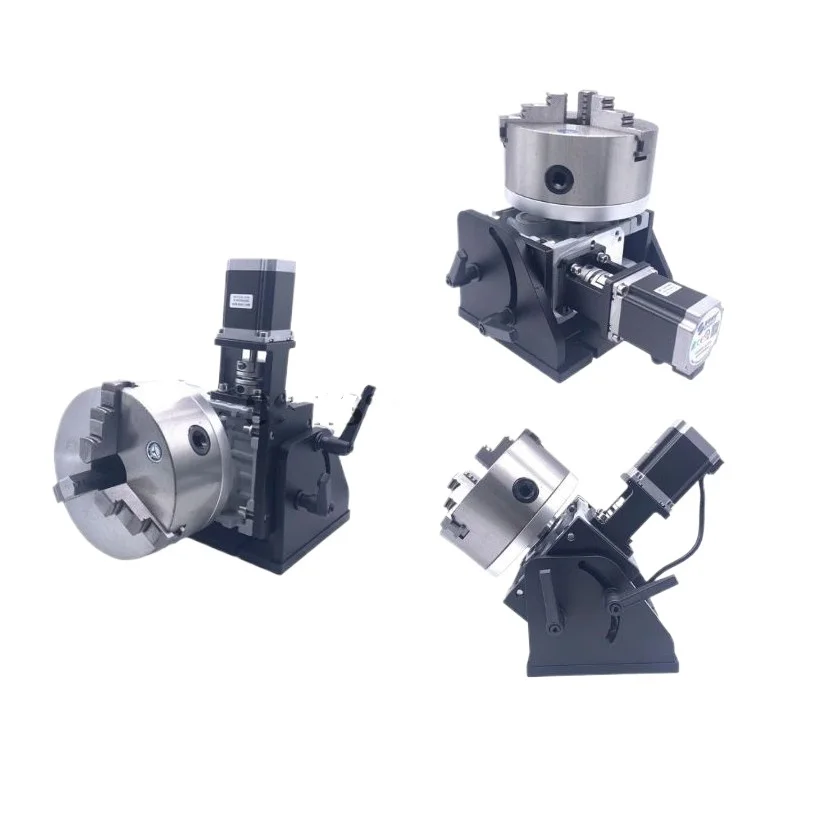
CNC Automatic Rotary Table, Positioner Manipulator Argon Arc Welding Laser Marking Circumferential Seam Welding Table
Request pricing, MOQ and lead time for this product — we reply within 24 hours.
Description
Control box manual
Welcome to our company's product. This product can control the operation of the stepper motor rotary table, start stop, and stepless adjustment
Speed, built-in several commonly used working modes, suitable for manual welding positioner, combined with robotic welding
Applications such as flip over, assembly, polishing, cutting, inspection, indexing and punching.
1、 Function Introduction
1. P0-3 jog mode, step on the pedal and turn straight, release to stop. 2. P0-4 linkage mode, step on the foot pedal and keep rotating, then step on it again to stop. 3. P0-5 angle control, with foot pedal control for forward and reverse rotation according to the set angle.
2、 Operating instructions
1. The startup display value is the speed value of the controller. When running, rotate the knob left and right to adjust the speed. P2 and P4 can change the default startup speed.
2. Parameter description: P 0 operation mode selection, (P0-3, P0-4, P0-5). P1 forward rotation angle, P2 forward rotation speed, P3 reverse angle, P4 reverse speed. P5 cycle count, (default is 1) P6 forward to bit delay, P7 reverse to position delay, P8 default parameter does not need to be changed.
3. Press the setting key to select the mode, and P0 will be displayed. Press the confirm button again, (factory default P0-4
Rotate the knob left and right to change the mode (P0-3, 4, 5). Press OK to select, then press Settings
Key to return.
4. Parameter adjustment P1, P3 forward and reverse angle parameter settings. Press the set button to display PO, rotate the knob to the right to display P1, and then press the confirm button. Display 10. 000 (10 degrees) Press the left shift key X -, right shift key X+to select the value that needs to be changed, and flash. Rotate the knob left and right to change the value. Press the confirm button to save, and press the set button to return. (Hundreds can be displayed by shifting left)
5. P2 and P4 forward and reverse speeds, press the left shift key X - and right shift key X+to select the value that needs to be changed, and flash. Rotate the knob left and right to change the value. Press the confirm button to save, and press the set button to return.
Factory reset. Press and hold the left shift key X - and the right shift key X+at the same time before starting up and powering on to quickly Factory reset. Need to reset the working mode
Product parameters
[Name]: Automatic Rotating Table
[Size]: 300 * 245 * 210MM
[Chuck]: 80, 100, 125, 160, 200
[
Detail images
Interested in this product?
Send your details and we will respond within 24 hours.